How to Check Shipping Bill Status? Step by Step Guide to Check Status on ICEGATE 2026
Simplify Your International Payments
Skip the complexity of traditional wire transfers with EximPe's smart payment solutions
Complete international transfers in hours, not days, with real-time tracking
Streamline BOE and Shipping Bill regularization online, and generate e-BRCs effortlessly.
Shipping Bill Status is the real-time customs clearance progress of your export shipment than can be tracked through ICEGATE. After your CHA files a Shipping Bill (export declaration) with Indian Customs, the SB (Shipping Bill) status shows whether your goods are approved, under processing, cleared for export (LEO granted), or if EGM has been filed by the shipping line.
Tracking Shipping Bill status on ICEGATE is critical because it determines when your shipment can physically leave the port and when you can claim export incentives like IGST refunds and RoDTEP.
What is a Shipping Bill?
A shipping bill is an official customs document filed by exporters, containing details about the goods being exported, their value, destination, and payment terms. It is mandatory for legal clearance and for claiming any export incentives or duty drawbacks.
What Is Shipping Bill Status?
Shipping Bill Status is a real-time indicator that shows exactly where your export shipment currently stands in the Indian customs clearance process. After your CHA files a Shipping Bill, your shipment enters the customs system. As customs processes your paperwork and your goods move through the port, the status updates automatically to reflect current progress. For example, Under Assessment, Examination, Query Raised, Leo Granted Etc.
How to Check Shipping Bill Status on ICEGATE: Step-by-Step Guide
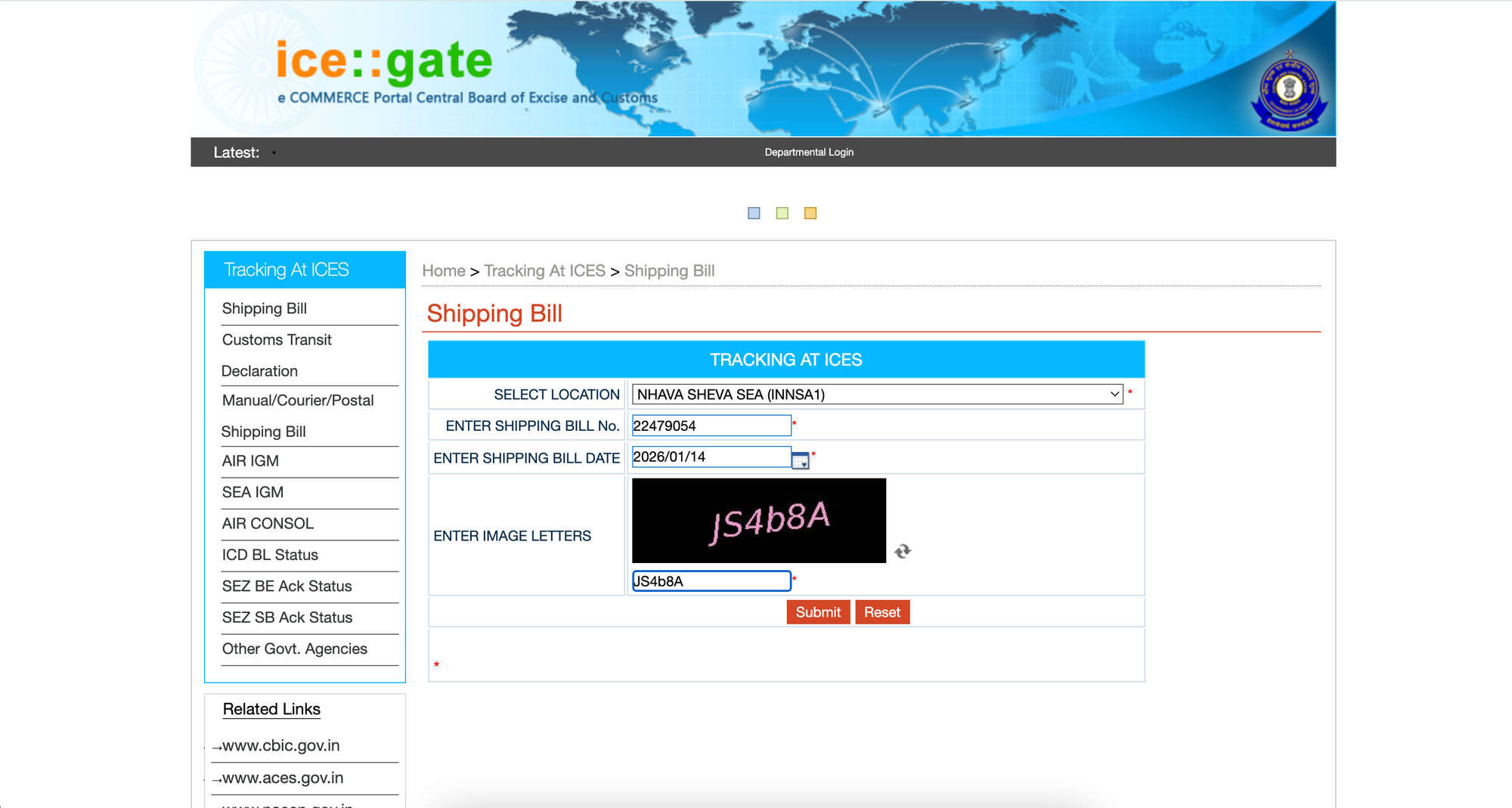
ICEGATE provides real-time tracking of your shipping bill status. You can check without logging in (public inquiry) or with login (detailed view).
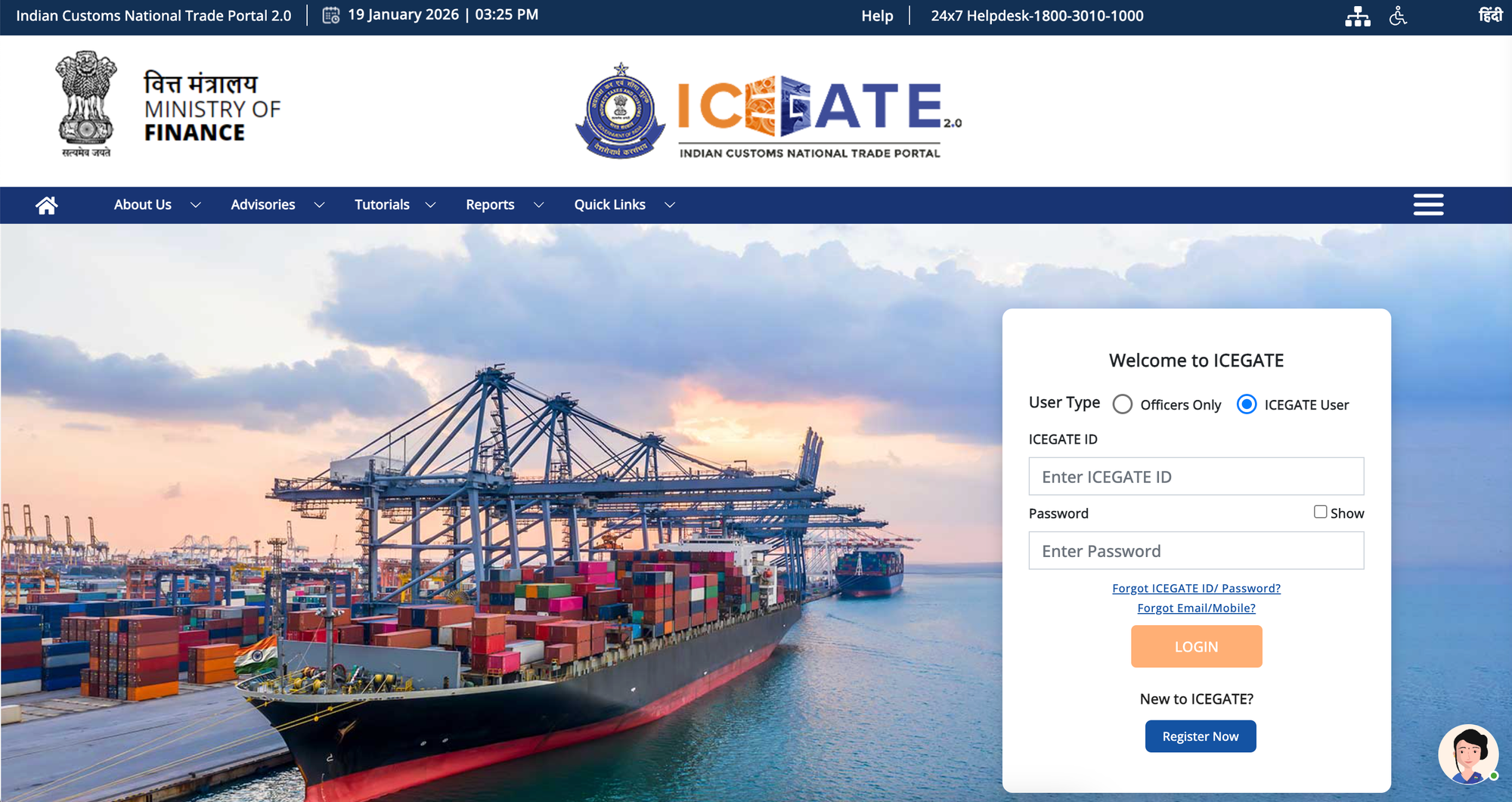
ICEGATE Login (Detailed View) - For Registered Users
Step 1: Log Into ICEGATE
Visit
Click "Login" (top right)
Enter your IEC and Password
Step 2: Click "Services"
From dashboard, click "Services" menu
Step 3: Select "Document Status"
Navigate to Services → Document Status → Shipping Bill
Step 4: Enter SB Details
Fill in:
- Shipping Bill Number
- Date
- Port Code
Step 5: View Detailed Status
Get more detailed information than public inquiry:
- Complete processing history
- All status changes with timestamps
- Query details (if any)
- Customs officer remarks
- LEO details
- EGM status
Understanding Shipping Bill Status: The 7 Main Status Types
After filing a Shipping Bill, your shipment moves through these status stages. Each means something different.
Status Type 1: "SB Submitted" or "SB Under Processing"
What It Means: Your Shipping Bill has been received by customs and is waiting for initial review by the customs officer.
Status Type 2: "SB Approved"
What It Means: Customs has reviewed all your documents and everything looks correct. Your Shipping Bill is approved for export.
Status Type 3: "Query Raised" or "Pending Clarification"
What It Means: Customs has identified an issue with your Shipping Bill or documentation and needs clarification before proceeding.
Status Type 4: "Physical Examination Pending" or "Exam Scheduled"
What It Means: Customs has scheduled a physical inspection of your goods at the port. Customs officers will physically verify goods that match your documentation.
Status Type 5: "Goods Examined" or "Exam Complete"
What It Means: Physical examination of your goods is complete. Customs found everything acceptable.
Status Type 6: "LEO Given" (Let Export Order) - THE MOST IMPORTANT STATUS
What It Means: Customs has granted final clearance. Your goods are permitted to be loaded onto the vessel or aircraft and can physically leave India.
Status Type 7: "EGM Filed" (Export General Manifest)
What It Means: The shipping line has officially filed the Export General Manifest (EGM), confirming that your goods have physically left India on the declared vessel/aircraft.
Status Type 8: "Rejected" or "SB Cancelled" (Rare)
What It Means: Customs has rejected your Shipping Bill. Goods cannot be exported in their current form.
Did you know: Rejection is RARE (less than 1% of shipments). Most issues are resolved through queries/clarification.
Benefits of Tracking Shipping Bill Status for Exporters
Understanding and tracking your shipping bill status is critical because:
- Know When Goods Can Leave the Port
- Identify Customs Issues Early
- Update Your Buyer with Accurate Shipment Timelines
- Manage Shipping Line and Transportation
- Claim Export Incentives & GST Refunds
- Manage Cash Flow & Working Capital
Difference Between Bill of Entry and Shipping Bill
FAQs – Frequently Asked Questions
1. What is the essential difference between a Shipping Bill and a Bill of Entry?
A Shipping Bill is the Customs document filed for exports (goods going out of India). A Bill of Entry is the equivalent Customs document filed for imports (goods coming into India). Both documents are essential for Customs clearance in their respective transactions.
2. Can I download my Shipping Bill from ICEGATE without a login?
No, you cannot download the final, official, digitally signed copy of the Shipping Bill in PDF format without a successful login to your registered ICEGATE user account. However, you can check the live icegate shipping bill status (LEO status, EGM status) without logging in, using the 'Public Enquiry at ICEGATE' facility.
3. What is 'LEO' on a Shipping Bill and why is it important?
LEO stands for Let Export Order. It is the final physical or electronic endorsement granted by the Customs Officer, signifying that the goods have been examined/verified and are cleared to be loaded onto the vessel or aircraft. The LEO date is the official date of export and is vital for validating GST refunds and incentive claims.
4. Why is my Shipping Bill not visible on the DGFT portal?
Your Shipping Bill data might not be visible on the DGFT portal if: a) The final Let Export Order (LEO) has not yet been granted by Customs. b) The Export General Manifest (EGM) has not been filed by the carrier. c) There is a temporary technical issue or a delay in the automatic data transfer from the ICEGATE/Customs system to the DGFT system. Always check your icegate shipping bill status first to confirm LEO is done.
5. Is the Shipping Bill download service on ICEGATE free of cost?
Yes, the service to download the final, electronically transmitted, and digitally signed copy of the Shipping Bill from the ICEGATE portal is free of cost for all registered exporters and their agents.
Simplify Your International Payments
Skip the complexity of traditional wire transfers with EximPe's smart payment solutions
Lightning Fast
Complete international transfers in hours, not days, with real-time tracking
Bank-Grade Security
Multi-layer encryption and compliance with international banking standards
Global Reach
Send payments to 180+ countries with competitive exchange rates
Why Choose EximPe for International Payments?
EximPe Support
How can we help you with your global payments today?
Stay Informed with EximPe News
Subscribe to our newsletter for the latest updates on import-export regulations, market trends, and exclusive insights from industry experts.